

Features
Compliance management
Complass guides your team through the frameworks that apply to your company, from applicability to the audit, without having to pore over standards first.

Several frameworks at once, each with its own requirements, documents and evidence, and often nobody in-house who knows them all in detail.
How Complass helps
Guided projects per framework
Phases and steps explain what is required, why and how to proceed in practice, with checklists and “your next step”.
Templates with guidance and approval
Policy, scope, emergency plan and more: every section with guidance and a sample text. Draft, review, approval and versions, exportable as a Word file.
Requirement catalogues and Statement of Applicability
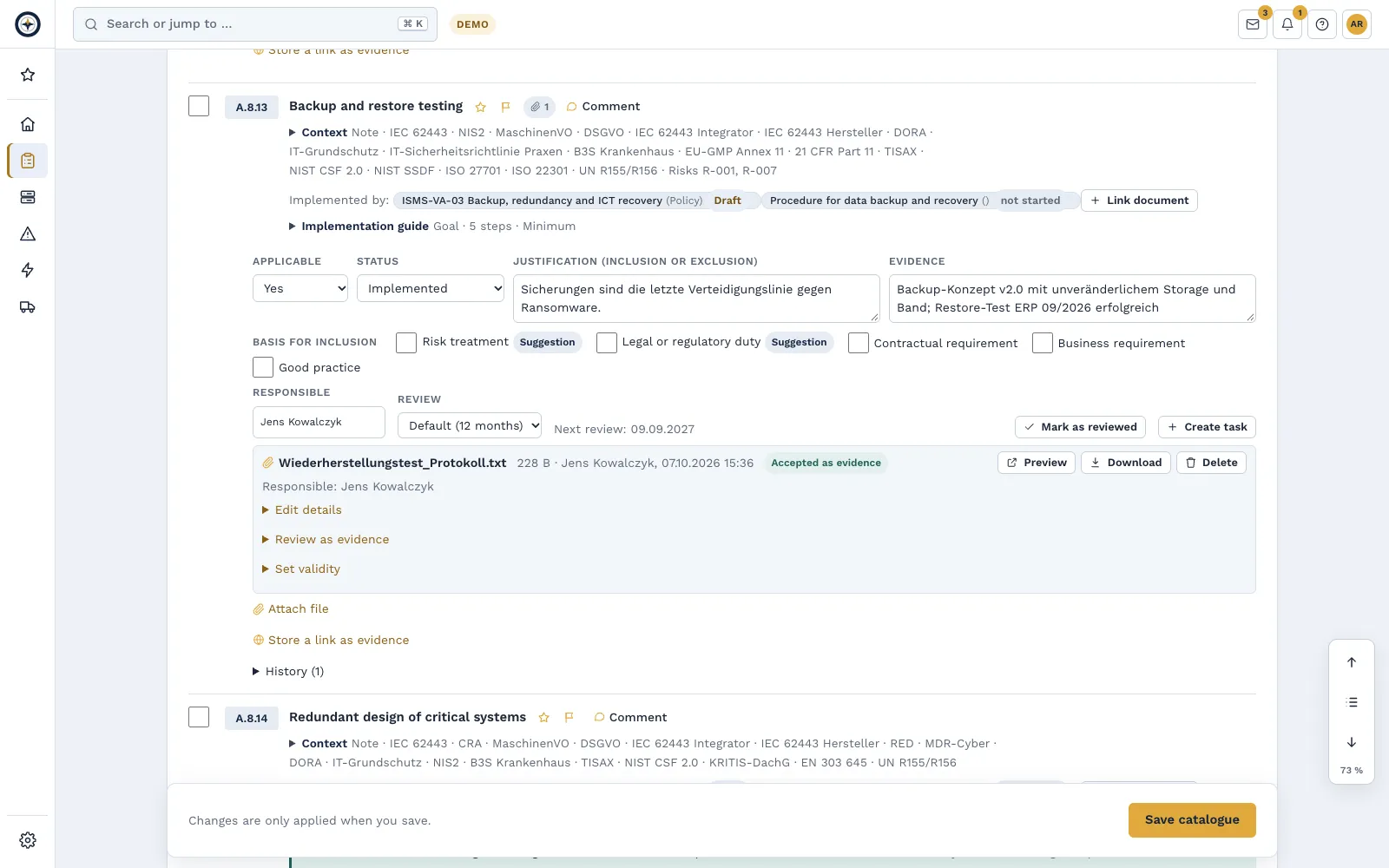
Applicability, justification, status and evidence per requirement, plus an owner and a review cycle. Evidence such as certificates and test reports carries an expiry date; Complass reminds you in good time. The SoA is reviewed like a document, approved as a version and stored with a checksum. 40 cross-cutting measures link the catalogues: what is done for one framework counts for the others too.
Implementation guide per requirement
For every requirement Complass explains what is meant, what an auditor wants to see and how to proceed in practice, for NIS2, ISO 27001, IEC 62443, DORA, TISAX and further frameworks.
Completed measures reach the catalogue
When a task is completed or new evidence is added, Complass proposes the new implementation status. The owner confirms it with one click and the SoA goes into revision. Nothing changes without confirmation.
Gap analysis and action plan
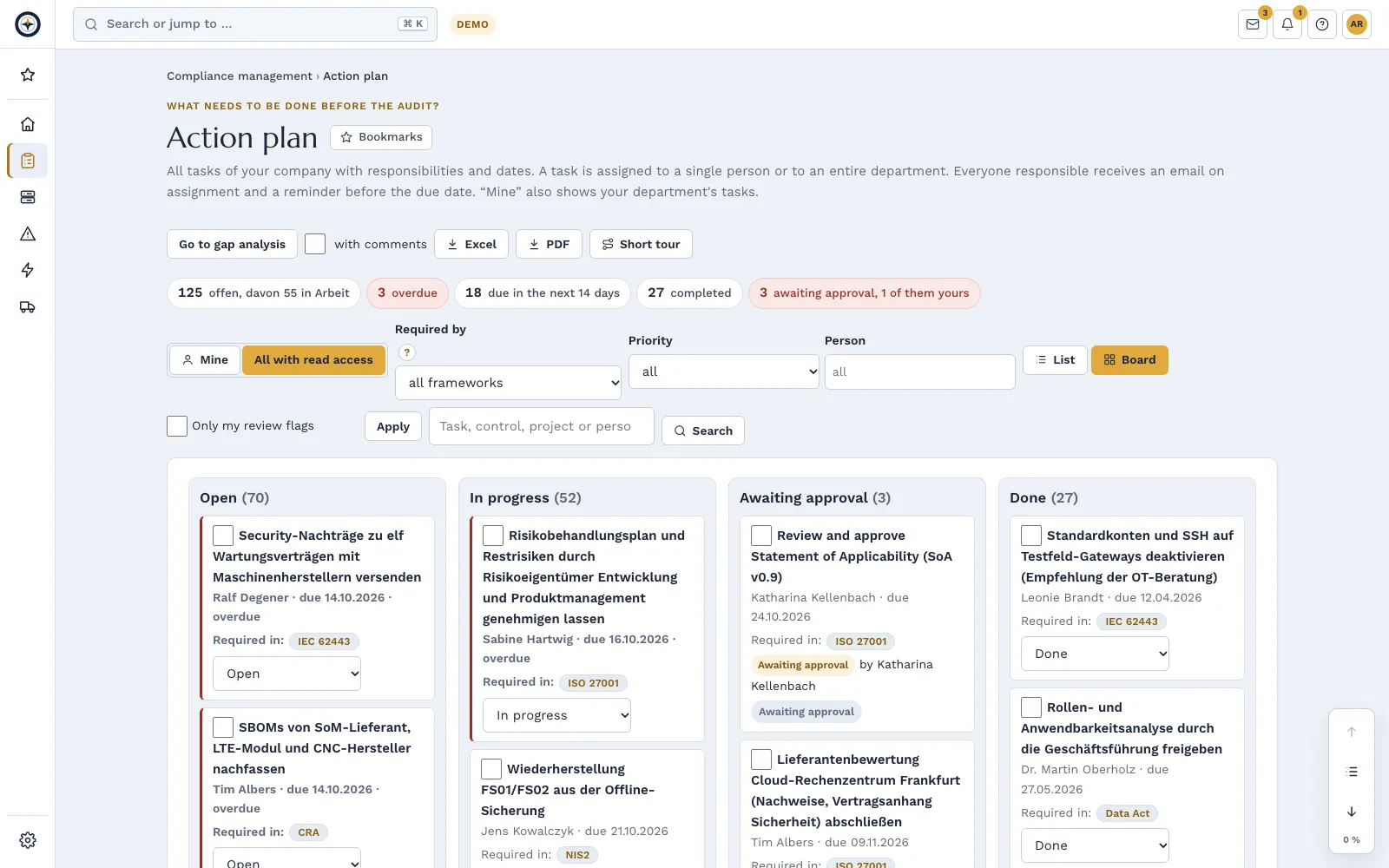
Rate the maturity per measure, spot the biggest gaps across all frameworks and carry them into the action plan: with owners, due dates, email reminders and recurring tasks, for example for restore tests or access reviews. Dated snapshots of the results show what has changed since the last audit.
Tasks with approval
On request, a completed task goes to a second person, usually the responsible one, who approves it or returns it for rework with a comment; approving your own task is not possible. Filters by priority, person and your own tags and an archive for completed tasks keep the plan clear.
All deadlines in view
Deadlines from more than 20 areas in one list: tasks, reporting deadlines, risks, documents, evidence, assets, audits, vulnerabilities and more, sorted by “overdue”, “this week” and month. As a calendar subscription in Outlook, Apple or Google, by default with type and number only.
Audit package at the push of a button
Audit dates in the project plan, status report and catalogues as PDF and Excel, the compliance package as a ZIP with all evidence files and checksums, and the audit export for auditors: everything according to read permissions in one ZIP file, with an offline start page. A manifest with checksums shows that the package is unchanged; you verify this in the portal with “Check package”.
Management report under ISO/IEC 27001 9.3
A PDF for management with implementation status, risks, incidents, vulnerabilities, audits and deadlines, plus the trend of the key figures. Choose the period and add your own assessment and decisions. You file the management review with its decisions as evidence. Administrators also see the indicators per site. You can also download the report and the indicator trend as an Excel file.
Management cockpit under Section 38 BSIG
Resolution on the measures, quarterly oversight and training records of the management on one page. Every member confirms personally with a passkey or app code; Complass files the evidence as a PDF with a checksum.
Legal and normative basis
- § 30 BSIG§ 30 BSIG Risikomanagementmaßnahmen besonders wichtiger Einrichtungen und wichtiger Einrichtungen(1) Besonders wichtige Einrichtungen und wichtige Einrichtungen sind verpflichtet, geeignete, verhältnismäßige und wirksame technische und organisatorische Maßnahmen, die in Absatz 2 konkretisiert werden, zu ergreifen, um Störungen der Verfügbarkeit, Integrität und Vertraulichkeit der informationstechnischen Systeme, Komponenten und Prozesse, die sie für die Erbringung ihrer Dienste nutzen, zu vermeiden und …Open original (gesetze-im-internet.de) ↗
- Art. 21 NIS2-RichtlinieArticle 21 NIS 2 Directive Cybersecurity risk-management measures1. Member States shall ensure that essential and important entities take appropriate and proportionate technical, operational and organisational measures to manage the risks posed to the security of network and information systems which those entities use for their operations or for the provision of their services, and to prevent or minimise the impact of incidents on recipients of their services and on other …Open original (EUR-Lex) ↗
- Anhang I Teil I CRAAnnex I Part I Cyber Resilience Act Cybersecurity requirements relating to the properties of products with digital elements(1) Products with digital elements shall be designed, developed and produced in such a way that they ensure an appropriate level of cybersecurity based on the risks. (2) On the basis of the cybersecurity risk assessment referred to in Article 13(2) and where applicable, products with digital elements shall: - (a) be made available on the market without known exploitable vulnerabilities; - (b) be made available on …Open original (EUR-Lex – OJ L 2024/2847, 20.11.2024, corrigenda incorporated: OJ L 2024/90780, 5.12.2024; OJ L 2025/90555, 2.7.2025; OJ L 2025/90828, 17.10.2025) ↗
- Anhang III Abschn. 1.1.9 MaschinenVOAnnex III Section 1.1.9 Machinery Regulation Protection against corruptionThe machinery or related product shall be designed and constructed so that the connection to it of another device, via any feature of the connected device itself or via any remote device that communicates with the machinery or related product does not lead to a hazardous situation. A hardware component transmitting signal or data, relevant for connection or access to software that is critical for the compliance of …Open original (EUR-Lex – OJ L 165, 29.6.2023; Art. 3, 8, 20, 25a–25e and 47 as consolidated on 27.07.2026) ↗
- ISO/IEC 27001:2022
- IEC 62443-3-3


Document control (ISO/IEC 27001, 7.5.3)
Documented information has to be controlled: available, protected, approved and current. Complass maps this in the portal, from the policy down to the work instruction.
Document IDs, classification and owners
Every document with a unique identifier, classification level and responsible person.
Review cycle with resubmission
Due reviews appear in time as a task.
Four-eyes approval with reason for change and version comparison
Every new version needs a reason for change and a second person for approval. You compare two approved versions section by section; superseded and withdrawn versions remain traceable.
Acknowledgement “read and understood”
Those who need to know a document confirm it; the status is visible per person.
Document pyramid as a tree
Policy, guidelines, procedures and work instructions are linked. When a document higher up is approved anew, the documents below show “review open” and the owners are notified. The register shows the tree with filters such as “review open” and “without evidence”; exports contain the level and the parent document.
Evidence from operations
Link policies and procedures to backup jobs, restore tests, continuity plans, assets and suppliers. Their current state appears in the document and in every approval. In the catalogue and the SoA, “Implemented by” shows which documents implement a requirement.
One policy for several frameworks from Professional
You keep policies such as backup, access or cryptography once in the library and use them in every framework: one version, one review date, one approval, one acknowledgement.
Checklists in templates
A row that is not implemented becomes a task; the row names the control test that checks it.
From deadline to evidence
An example with data of a fictitious company: this is how a recurring duty such as the annual penetration test runs through Complass.

Assess and link the SoA

The short film shows the German user interface.
Audits, evidence and objectives
From the internal audit to the corrective action in one chain, with evidence that keeps itself up to date.
Internal audit programme
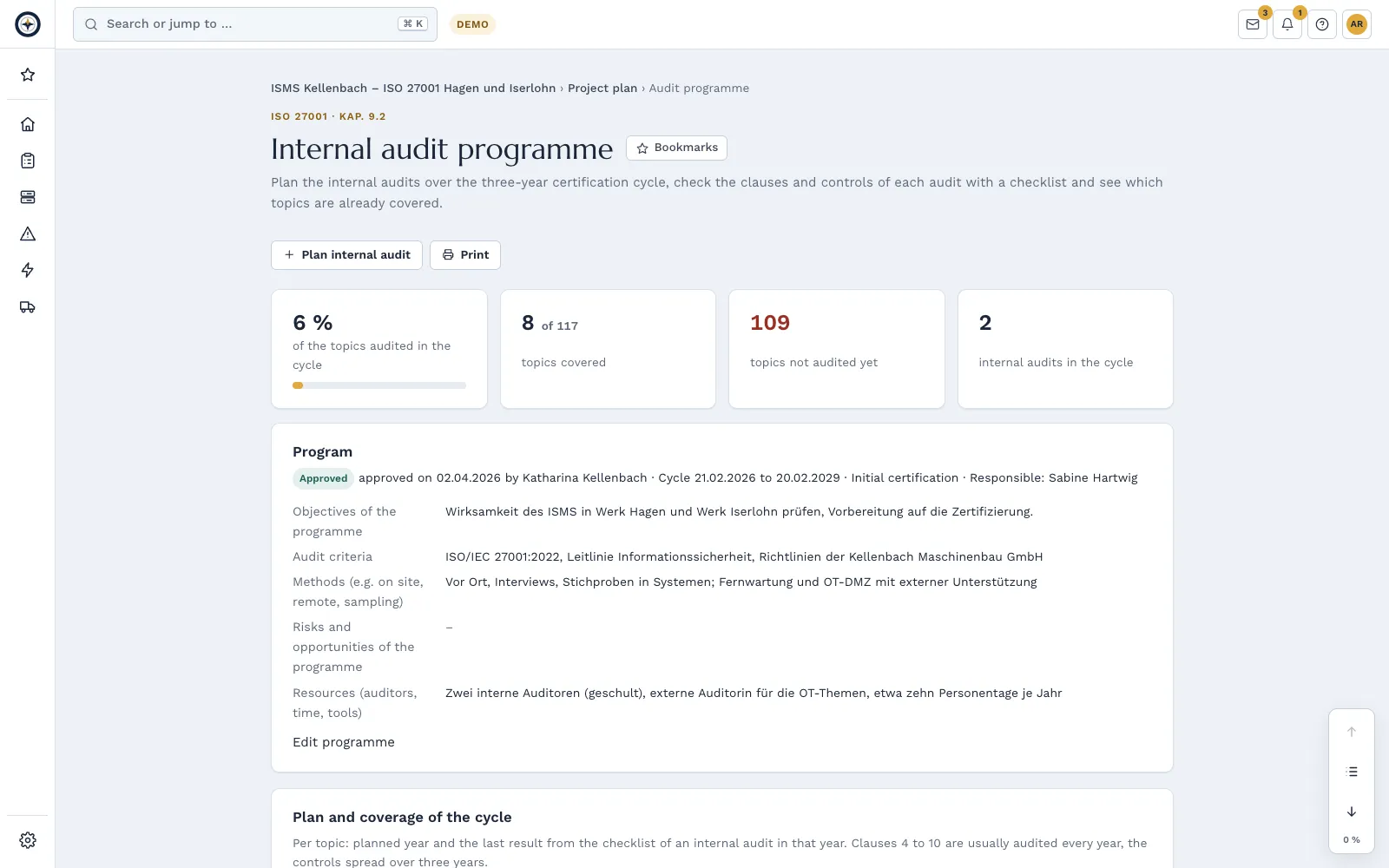
Plan your internal audits across the three-year certification cycle, with the programme approved by management or an administrator. Every internal audit has an audit plan and a checklist per clause and control, and an overview shows what has already been audited in the cycle. For ISO/IEC 27001, ISO 22301 and further ISO management system standards.
Findings register
Nonconformities and observations from audits, pentests, exercises, missed indicators or your own findings in one register, with root cause, corrective action and effectiveness check. Complass notifies the responsible person of overdue corrective actions, and after 14 days the administrators and management too. The audit report is generated as a PDF.
Automatic evidence from Microsoft 365 and GitHub from Professional: Automatic evidence, compare packages
Once a day, read-only, Complass reads the settings of your Microsoft Entra ID tenant and your GitHub organisation, such as MFA registration, conditional access, number of global administrators, two-factor requirement or protected branches. Every check appears with a traffic light and history at the matching requirements of your frameworks. Numbers are stored, not names of people.
Evidence with a second look
A second person reviews evidence files and accepts them or rejects them with a reason. Before the audit you request missing evidence from the owners with an internal evidence request. Exports show which evidence is older than the audit period.
Certificate register coming soon
Your own certificates and those of your suppliers in one list, with validity, surveillance and recertification audits and a reminder before every audit. Complass reads the details from the certificate PDF on its own server, without an AI service; you check them before saving.
Control tests
Every night Complass checks automatically whether your data still supports a measure, such as restore tests or evaluated emergency exercises. Every test counts as evidence.
Objectives and indicators
Measurable objectives for ISO/IEC 27001, ISO 9001 and ISO 22301 with target value, responsible person and deadline, measured against an indicator from Complass or against values you enter yourself. A traffic light with symbol and text shows whether an objective is on target. You adopt typical objectives from suggestions.
Liability proof for management
A sealed PDF shows when management resolved, oversaw and was trained on the measures.
What has changed
When a law, standard or authority guidance on your frameworks changes, Complass shows the affected requirements.
Auditor portal: your audit happens in Complass.
Invite certification auditors, external auditors or customer auditors straight into an audit in Complass – no e-mail ping-pong, no ZIP files. Auditor accesses are free of charge, bound to exactly this audit and end automatically on the end date.
Auditors put their request list straight into Complass – from templates for ISO 27001, NIS2 and IEC 62443 or by import. For each audit you release only the evidence that is needed; answering a request releases its evidence. Questions sit right on the document, and auditors never see internal notes.
Auditors sign in with their own auditor account and see all their audits at different customers under “My audits”; an audit firm manages its members itself. For samples, a list is frozen and drawn from in a traceable way, and anyone can recompute the log. Files for auditors carry a watermark with name, company and trace ID on request. In the following year you carry over the request list and resubmit unchanged answers with one click.
Auditors propose findings; you take them into your findings register or decline them with a reason. At the end the auditor confirms the audit closing after signing in again; the result is stored as a PDF with your evidence, together with a sealed handover package with checksums. Every page an auditor opens is in the auditor log.
Frequently asked questions
Can I work on several frameworks at the same time?
Yes. Each framework is its own project; the “Frameworks” overview shows which measure addresses which requirements. Status and evidence can be linked between projects instead of copied.
Can we reuse existing documents?
You import tables such as asset lists or action plans from Excel or CSV. You add existing policies to document control as your own documents. You attach other files as evidence to the matching requirement.
How does our auditor get access?
You invite them to an audit free of charge: time-limited, limited to that audit and with every access logged. If they already have an auditor account, they see your audit there next to their others. Alternatively you export the compliance package.
Try Complass with your own data
Set up your trial yourself, with a sample project per framework if you like. If you would rather see Complass first, request a demo.